
Silly Admin
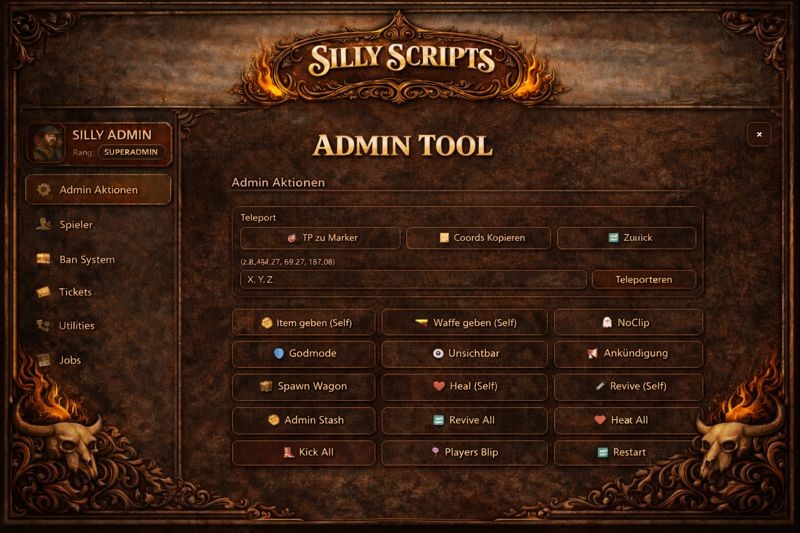
Modern admin system for RedM (NUI + client/server Lua) with logs, tickets, job management, and clear permissions.
Performance-focused • clean permissions • Discord logging • VORP-compatible
Preview: Video
📌 Overview
Silly Admin is built for RedM servers that want a clean, role-based admin panel with a lightweight NUI. Actions are permission-checked server-side and logged to Discord via categorized webhooks.
✨ Highlights
🧭 Teleport & player tools
- Bring / Teleport-to-Player (and more by rank)
- Higher ranks can unlock additional options (e.g. coords)
🎫 Ticket system
- Accept, assign, reply, close, teleport to ticket
- Works best when the player is online
🧰 Admin actions
- Heal / Revive / Kill, Kick / Warn, and more
- Available actions depend on rank
🧑💼 Jobs management
- Create/manage jobs & grades, Set Job
- Separate Discord webhook for job logs
📦 Items & weapons
- Give items / give weapons, catalog & preview
- Separate webhooks; self-give keeps the menu open
🕵️ NoClip
- Fast noclip with real invisibility while active
- Designed to be performant
🧾 Discord logs
- Colored, categorized logging (teleport/tickets/items/weapons/jobs)
- Easy to split by staff channel
🧩 Compatibility (VORP)
RedM: Supported - Built specifically for RedM
VORP: Compatible - Typical use-cases like jobs, items and weapons are supported (depending on your exports/setup)
Other / heavily modified frameworks: Possible - Item/weapon catalogs or job calls may differ; adjust integration as needed
📦 Installation
- Place the resource in your resources folder (example:
resources/[admin]/Silly_Admin) - Import
database.sqlinto your database - Ensure dependencies and the resource in your
server.cfg:
ensure oxmysql
ensure Silly_Admin
- Configure
Silly_Admin/config.lua(roles, webhooks, tokens, etc.)
⚙️ Configuration
🔐 Permissions (Discord roles / Steam fallback)
Permissions can be handled via Discord roles (recommended) and optionally via Steam/license lists (fallback).
Config keys:
-
Config.UseDiscordPermissions- Enable Discord-role based permissions -
Config.UseSteamPermissions- Enable Steam/license identifier fallback permissions -
Config.DiscordRoles- Role IDs from your Discord server -
Config.SteamAdmins- Steam/license identifiers allowed as admins (fallback)
🪪 Ranks
trial_supporter - Trial / entry level
- Access: Teleport (Teleport-to-Player + Bring) + Tickets
support - Support team
- Access: Tickets + additional player tools (depending on config)
moderator - Moderation
- Access: Moderation actions (e.g. coords, freeze, warn, etc.)
admin - Admin
- Access: Items/weapons/jobs management + extended actions
superadmin - Full access
- Access: Everything
Important: Both UI and server verify permissions. A visible button does not guarantee the server action is allowed.
🌐 Discord webhooks
For better overview, actions are split across multiple webhooks (with matching colors).
Webhook configuration:
-
Config.Webhooks.admin_actions- General admin logs -
Config.Webhooks.jobs- Jobs management / Set Job -
Config.Webhooks.items- Give item logs -
Config.Webhooks.weapons- Give weapon logs
🧠 Features (detailed)
🎫 Tickets
- Players can create tickets
- Support/trial-support can view, accept, reply & close tickets
- Teleport to the ticket player (if still online)
🧭 Teleport
- Trial supporter: Teleport-to-Player + Bring
- Moderator+: Teleport to coordinates, Teleport to marker (via admin menu)
📦 Items / Weapons
- Catalog and preview in the menu
- Give to other players or to yourself
- Self-give stays open (fast repeated giving)
- Separate webhooks for item/weapon logs
🧑💼 Jobs
- Job management (create jobs / grades)
- Set Job / job overview
- Separate webhook for job logs
🛠️ Troubleshooting
-
Permissions not working: Check
Config.GuildId,Config.BotTokenand the role IDs inConfig.DiscordRoles -
Logs not arriving: Verify
Config.Webhooks.*URLs (no spaces, complete URL) -
DB errors: Ensure
database.sqlwas imported and your MySQL wrapper is running correctly
📄 Notes
This resource is an admin system for your server. Adjust permissions and webhooks to match your staff structure.
